3. Using different IDEs for developing WAPT packages
3.1. Configuring WAPT to use supported IDEs
If you are used to work with another IDE, you can be relieved now as WAPT supports many popular text editors.
Note
Using a supported IDE will launch the WAPT package project with a valid debug configuration.
3.1.1. On Windows
Text editor name |
Accepted keywords |
Text editor logo |
|---|---|---|
PyScripter |
|
|
Visual Studio Code |
|
|
Visual Studio Codium |
|
|


To configure another editor for WAPT (for example vscode), you MUST modify the editor_for_packages attribute in the preferences box in Tools.
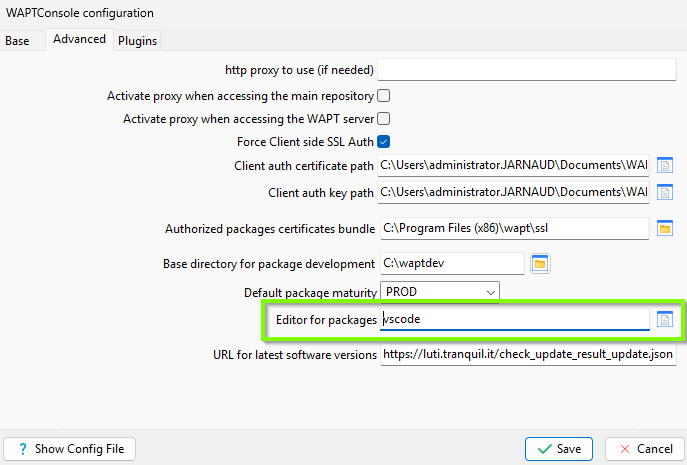
Editor for package parameter
To configure another editor for WAPT (for example vscode), you MUST modify the editor_for_packages attribute in the [global] section of your WAPT Console’s %LOCALAPPDATA%\waptconsole\waptconsole.ini configuration file.
[global]
...
; with a keyword
editor_for_packages = vscode
; or with the path to the binary
editor_for_packages = "C:\Program Files\Microsoft VS Code\Code.exe"
3.1.2. On Linux / macOS
Text editor name |
Accepted keywords |
Text editor logo |
|---|---|---|
Visual Studio Code |
|
|
Visual Studio Codium |
|
|
Nano |
|
|
Vim |
|
|
Vi |
|
vi |


To configure another editor for WAPT (for example vscode), you MUST modify the editor_for_packages attribute in the preferences box in Tools.
Editor for package parameter
To configure another editor for WAPT (for example vscode), you MUST modify the editor_for_packages attribute in the [global] section of your WAPT Console’s %LOCALAPPDATA%\waptconsole\waptconsole.ini configuration file.
[global]
...
; with a keyword
editor_for_packages = vscode
; or with the path to the binary
editor_for_packages = "C:\Program Files\Microsoft VS Code\Code.exe"
By default, if the editor_for_packages attribute is empty, WAPT will try to launch (in that order):
vscodium;
vscode;
nano;
vim;
vi.
3.2. Configuring WAPT to use a custom editor
[global]
...
editor_for_packages = C:\Program Files\Notepad++\notepad++.exe {setup_filename}
[global]
...
editor_for_packages = /opt/pycharm/bin/pycharm_x64 {wapt_sources_dir}
3.2.1. Custom arguments
Argument |
Description |
|---|---|
|
Launches custom editor and edit WAPT package |
|
Launches custom editor and edit WAPT package |
|
Launches the custom text editor and opens the WAPT package folder. |
|
Launches the custom text editor and opens the WAPT install folder. |