5. Proxycache by WAPT 


5.1. Introduction
ProxyCache is a WAPT feature designed to replace the legacy secondary proxycache mirror system. It downloads and caches packages on-demand from the primary WAPT server, improving efficiency and reducing unnecessary data synchronization.
ProxyCache offers several key advantages, but also introduces some considerations.
Advantages |
Considerations |
|---|---|
Bandwidth optimization: Only requested packages are downloaded, reducing unnecessary data transfer. |
Migration needed: Secondary repository mirrors are deprecated and will be removed in WAPT 2.7.1. |
Disk space efficiency: Unused packages are not stored, and automatic cleanup frees up space. |
Network dependency: Requires reliable connectivity to the primary WAPT server for uncached packages. |
Concurrent downloads: Supports multiple simultaneous downloads, eliminating synchronization delays. |
Configuration: Requires proper setup for optimal performance, especially in large environments. |
TFTP integration: Includes a built-in TFTP server that benefits from the same caching mechanism. |
5.1.1. How Proxycache Works
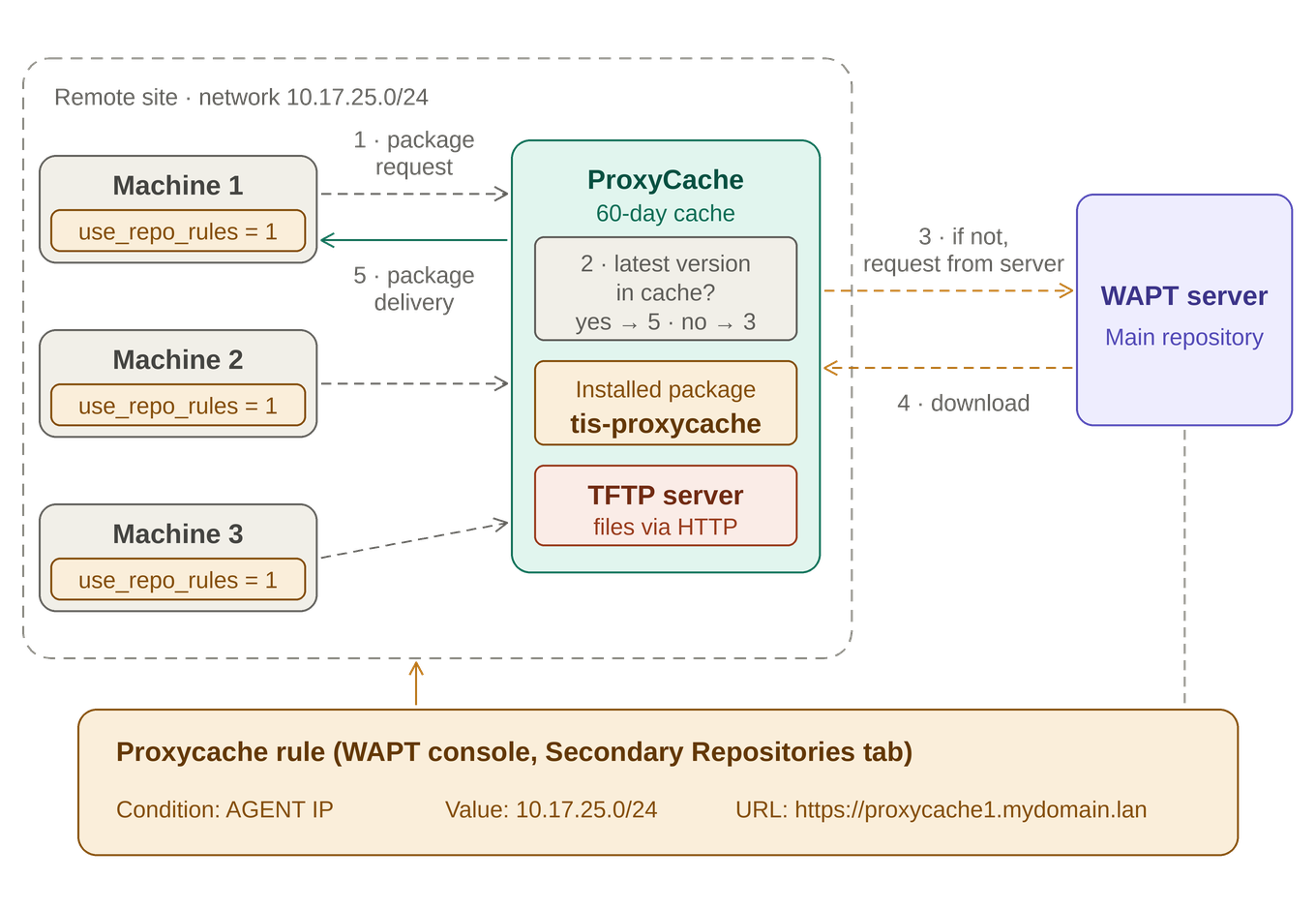
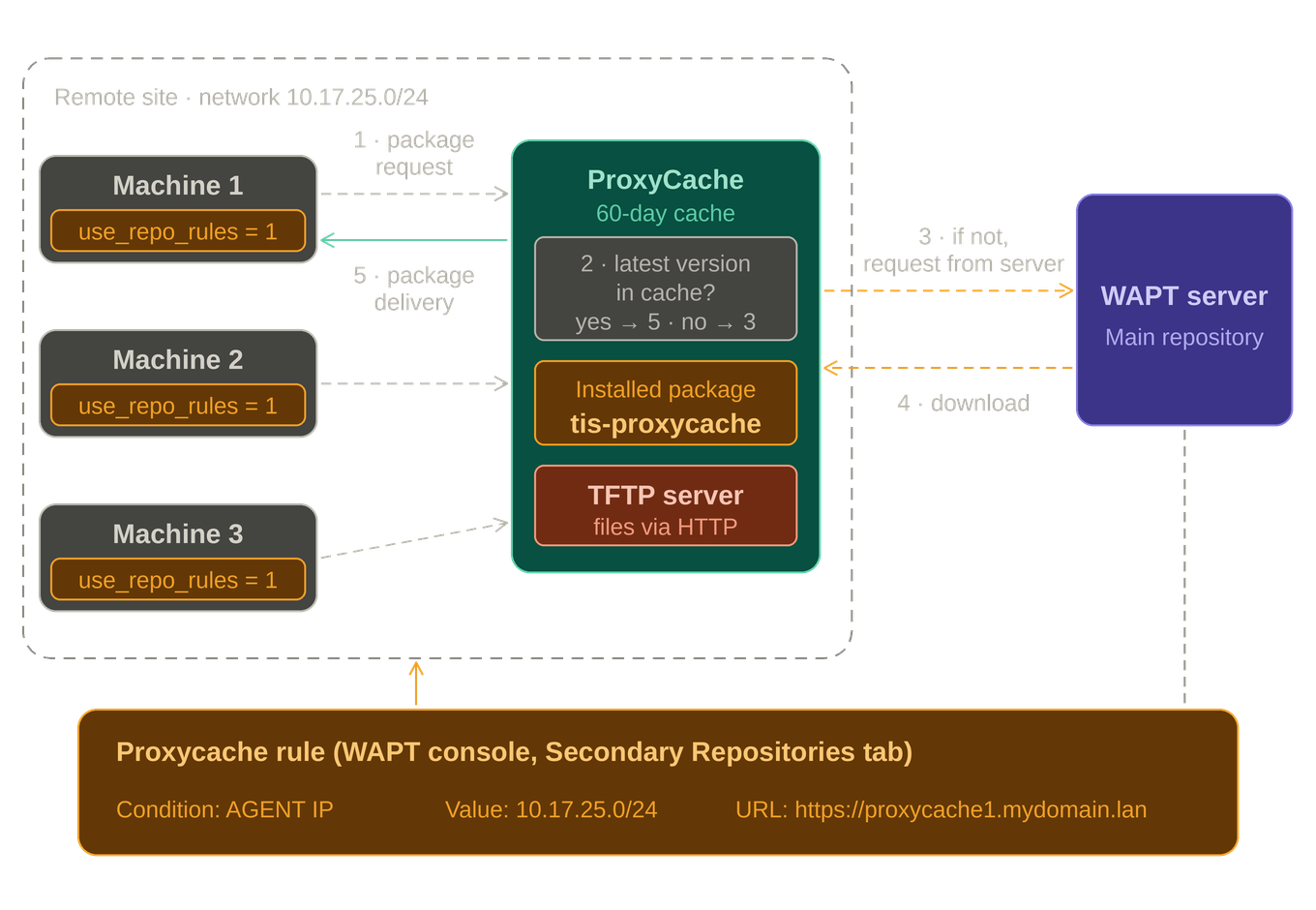
5.1.1.1. Diagram showing how the WAPT Proxycache works
5.1.1.2. Basic Principle
ProxyCache replaces the legacy secondary proxycache mirror system by downloading and caching packages on-demand from the primary WAPT server.
It ensures that only necessary packages are stored and served locally, optimizing bandwidth and disk space usage.
Activation: ProxyCache is enabled on a dedicated server or machine acting as a cache proxy.
On-Demand Download: When a client requests a package, ProxyCache checks its local cache. If the package is not available, it downloads it from the primary WAPT server.
Local Caching: The downloaded package is stored locally in the ProxyCache directory. Subsequent requests for the same package are served directly from the cache.
Automatic Updates: If the package on the primary server changes, ProxyCache re-downloads it to ensure clients always receive the latest version.
Cleanup Mechanism: Unused packages are automatically removed after a configurable period to free up disk space.
5.1.1.2.1. Example of Operation:
Package unkrown by the Proxycache |
Package already krown by the Proxycache |
|---|---|
A client requests the vlc package. ProxyCache does not have it in its cache, so it downloads the |
Another client requests the same vlc package. ProxyCache finds the file in its local cache and serves it directly, without contacting the primary server. |
Note
Integration with TFTP
TFTP integration: The TFTP server can fetch its files using the HTTP protocol (instead of only locally), allowing it to be directed toward the ProxyCache for optimized file distribution.
5.2. ProxyCache on the WAPT Server
The WAPT Server ProxyCache optimizes package distribution by caching packages from upstream repositories (such as Debian, Red Hat, and Ubuntu) for WAPT agents.
This feature is available starting with WAPT 2.7 and requires the WAPT server to have access to the upstream Linux repositories in order to download packages on demand.
Client machines retrieve packages directly from the ProxyCache and therefore do not require direct access to the upstream repositories.
Local Caching: Once a package has been downloaded, it is stored locally in the ProxyCache directory. Any subsequent requests for the same package are served directly from the local cache, reducing external bandwidth usage and improving download performance.
HTTP Server: ProxyCache does not use Nginx or Apache (httpd). It relies on a built-in HTTP server based on mormot2, specific to WAPT.
5.2.1. How it works
When a client requests a package, the WAPT Server checks its local cache.
If the package is not available, the server downloads it from the official repository mirrors (e.g., Debian or RedHat mirrors).
The package is then stored in the cache and served to the client.
5.2.2. Configuration
ProxyCache is configured via the proxycache.ini file (/opt/wapt/conf/proxycache.ini).
To enable the Server ProxyCache, answer yes when prompted to configure the ProxyCache during the postconf process.
You can check the status of the proxycache with the service waptproxycache.
Example:
systemctl status waptproxycache
Key parameters include:
Cache retention settings.
Proxied sources (Linux mirror repositories)
Logging
5.2.3. Requirements
The WAPT Server must have direct access to the official Linux/Windows repositories to fetch packages on-demand.
5.2.4. Cache Retention
By default, cached packages are retained for a maximum of 2 months.
If a package is requested again before the 2-month period expires, its retention timer is reset.
If a package is not requested for 2 months, it is automatically removed from the cache to free up disk space.
5.3. Agent ProxyCache (Secondary Repositories)
5.3.1. proxycache location on the WAPT Agent Proxycache
Operating System |
Value |
|---|---|
Linux |
|
Windows |
|
5.3.2. Setting Up Proxycache
1- download package tis-proxycache on the wapt store https://wapt.tranquil.it/store/fr/tis-proxycache or by the waptconsole.
On the waptconsole Package inventory → Import from proxycache → search proxycache → Import the package
2- install on the pacakge in dependancy on a desired machines or on a OU ( united organisation)
In the inventory select the machine → do a right-click → Edit hosts → select the proxycache package → add dependencies to package → and Save
In the inventory select the OU → Create or Edit Organizational Unit Package → select the proxycache → add dependencies to package → and Build Upload
3- Do few specific rules to target some proxycache for few machines.
Create your specific rule: Go to this part
4- Configuration is complete and everything is up and running.
5.3.2.1. Default Cache Configuration
By default, the WaptProxyCache package deploys with a pre-configured set of parameters in the conf.ini.
Notably, cached packages are retained for 60 days by default, as defined by the TimeoutSec parameter (5184000 seconds) in the [http_settings.DiskCache] section, as well as in each individual URL section ([http_settings.Url#X]):
[http_settings.DiskCache]
TimeoutSec=5184000

[http_settings.Url#X]
DiskCache.TimeoutSec=5184000
In addition, the disk cache size is unlimited by default (MaxSizeKB=-1), meaning no upper bound is enforced on the total amount of data stored locally.
As the ProxyCache agent is designed to retrieve and store a potentially large number of packages over time, and given the unlimited cache size combined with a 60-day retention period, administrators should ensure that sufficient disk space is allocated on the host machine and monitored regularly to avoid disk saturation.
Redirecting the disk cache with a symbolic link
The proxycache can grow quickly, especially when it serves packages, WUA updates and WADS images. It is common to store it on a dedicated disk or volume.
Warning
Do not change the cache location by editing the paths in the WAPT configuration files or in the proxycache package. Several internal WAPT paths are hardcoded, and the proxycache configuration is regenerated each time the package is installed or updated. A custom path would be lost or would break at the next update of the solution.
The recommended method is to keep the default path and redirect it to the other disk with a symbolic link. WAPT keeps using the path it expects, and only the storage location changes.
Stop the services WAPTProxyCacheHTTP, WAPTProxyCacheHTTPS and wapttftpserver.
Move the existing cache folder to the new disk (for example
D:\wapt_proxycache).Create the link from an elevated command prompt:
mklink /D "C:\Program Files (x86)\wapt\cache\proxycache" "D:\wapt_proxycache"
Make sure the
SYSTEMandNETWORK SERVICEaccounts keep Modify rights on the target folder.Restart the two services.
Stop the associated services.
systemctl stop waptproxycache-http.service

systemctl stop waptproxycache-https.service

systemctl stop  wapttftpserver.service
Move the existing cache directory to the new disk, or mount the new disk directly on the cache directory.
Alternatively, create a symbolic link:
ln -s /opt/wapt/private/cache/proxycache /path/to/proxycache
Check that the owner and permissions match those of the service account (and the SELinux context if enabled).
Restart the services.
systemctl start waptproxycache-http.service

systemctl start waptproxycache-https.service

systemctl start wapttftpserver.service
Note
The cache is rebuilt on demand, so you can also start with an empty directory on the new disk instead of moving the existing content.
5.3.2.2. Presentation of Rules
Rules are essential for providing hosts with information about where to retrieve new packages. To use this feature, hosts must have the use_repo_rule parameter enabled.
Warning
The rules are applied from top to bottom.
The first rule that matches the conditions overrides all the other rules placed under.
5.3.2.2.1. How to adding a proxycache rule
To add a new proxycache rule, go to the Secondary repos tab in the WAPT Console and click on the Add rule button.
Options |
Example value |
Description |
|---|---|---|
Name |
repo25 |
Defines the name for the proxycache rule. |
Condition |
AGENT IP / DOMAIN / HOSTNAME / PUBLIC IP / SITE |
Defines the condition to match for the proxycache rule to apply (see below). |
Value |
192.168.25.0/24 |
Defines the value when the condition applies. If NOT is checked, the value applies to the reverse of the condition. |
proxycache URL |
Defines the list of available remote proxycache. The list includes http://download.windowsupdate.com/microsoftupdate/v6/wsusscan/ to allow directly downloading of Windows Updates by the remote repositories to preserve WAPT Server bandwidth. If your certificate is self-signed, continue to use HTTP. |
|
Package type |
WAPT |
Defines what types of packages are replicated. |
Other |
No fallbacks |
The option No Fallback will prevent from falling back to the main WAPT Server and will avoid undesired network congestion if the remote proxycache becomes temporarily unavailable. |
The option Proxy will need to be set if the remote proxycache is required to connect via a proxy.
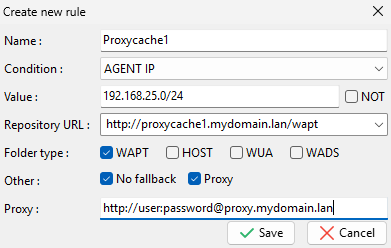
Window for setting proxycache rules in the WAPT Console
You can then choose from the different above parameters and affect values to a specific secondary WAPT proxycache.